The Definitive All-in-One Guide to TikTok Media Archiving & Cloud CDN Delivery
An authoritative, educational compendium for digital archivists, content creators, post-production video editors, and mobile researchers. Discover how modern content delivery networks process short-form video, uncompressed studio audio, multi-image carousels, disappearing 24-hour stories, master profile avatars, and Chinese Douyin streams without quality degradation, destructive compression, or watermark interference.
The Evolution of Multi-Format Content Ecosystems on TikTok
Over the past decade, short-form digital media has evolved from simple 15-second lip-sync clips into a sophisticated, multi-dimensional communication ecosystem. ByteDance's flagship platforms—TikTok internationally and Douyin across domestic Asia—now host an extraordinarily diverse spectrum of digital media formats. What began as a mobile-only social application is now a global video repository, sound laboratory, photo gallery, and cultural distribution engine.
Today, a single viral post might not be a video at all; it could be a 35-slide high-definition photo carousel documenting a visual recipe or architectural walkthrough, an original 320kbps audio sound bite that spawns millions of derivative tributes, or an ephemeral 24-hour behind-the-scenes story clip. Understanding the technical architecture across each media format allows creators and media archivists to preserve content with forensic fidelity:
Full HD Video Feeds
High-definition vertical videos up to 10 minutes in length, filmed at 1080p resolution and up to 60 frames per second using high-efficiency H.264 (AVC) and H.265 (HEVC) compression codecs.
Explore Video Downloader →Viral Audio Soundtracks
Original sound bites, sped-up musical remixes, speech synthesis narrations, and background scores (BGM) delivered in high-fidelity stereo audio up to 320kbps bitrate.
Explore MP3 Converter →•Ringtone Maker →Still Photo Carousels
Multi-slide visual galleries containing anywhere from 2 to 35 high-resolution still photographs set to synchronized audio, widely used for travel guides, photography lookbooks, and educational infocards.
Explore Photo Downloader →24-Hour Ephemeral Stories
Temporary video clips and status updates with an automated 24-hour time-to-live (TTL) expiration window, offering casual behind-the-scenes glimpses into creators' daily routines.
Explore Story Saver →Douyin Chinese Ecosystem
ByteDance's domestic Chinese network featuring cutting-edge visual effects, e-commerce livestreams, and creative templates from JianYing (剪映) that dictate future global trends.
Explore Douyin Downloader →Master Profile Avatars
High-resolution 1080x1080 square source profile photographs uploaded by creators, which the native smartphone app aggressively crops into tiny 80x80 circular thumbnails.
Explore Avatar HD →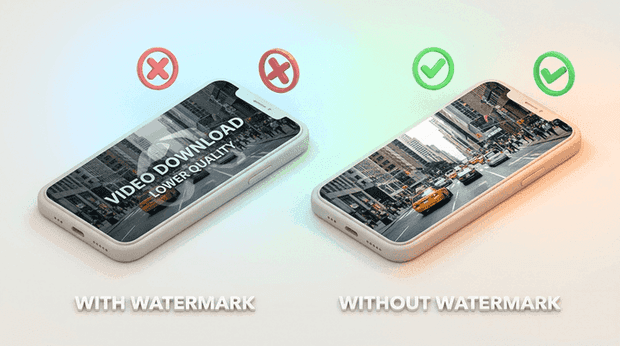
Cloud CDN Architecture: How Direct Stream Extraction Works
When you view media on TikTok, the server doesn't stream a single monolithic video file. Modern high-concurrency web platforms utilize distributed Content Delivery Networks (CDNs) located strategically in edge data centers across North America, Europe, Asia, and Latin America. These servers maintain separate, modular media representations to optimize delivery based on device speed and network conditions:
- Untouched Source Master: When a content creator records or renders a video and hits upload, the original high-bitrate video stream is written to storage. This file contains pure pixel data without any overlays, account handles, or trailing end cards.
- Post-Render Watermarked Container: To facilitate in-app sharing and enforce viral brand attribution, an automated server-side encoding queue burns the animated bouncing TikTok badge and creator ID into the frame stream, appending a 3-second black animated outro.
- Independent Audio Stream: Audio tracks are separated from video frames into independent MPEG-4 audio (
.m4a/.mp3) representations to facilitate instant synchronization, multi-track audio mixing, and duet recording.
Why Legacy Downloaders Fail: Many older web tools attempt to remove watermarks through destructive image processing—either by cropping the outer 15% of the video canvas (cutting off heads, subtitles, and logos) or applying a localized Gaussian blur filter that leaves a distracting smudge. QukTik operates on an entirely different architectural paradigm: our cloud routing engine accesses the authenticated source stream (play_addr) directly before the watermark overlay pipeline executes. This ensures you receive the pristine 1080p source video with 100% frame integrity and color fidelity.
The Science of Digital Audio Separation in Short-Form Content
Sound design on TikTok represents half the emotional impact of any viral post. Whether it is an original ambient field recording, a spoken-word commentary track, or a masterfully produced 15-second acoustic hook, audio files are encoded with high dynamic range. However, when users rely on smartphone screen recording to capture sounds, the resulting file suffers from dual compression: first through the phone's internal audio mixer, and second through the screen recorder's lossy AAC codec.
QukTik's media extraction pipeline isolates the original audio track directly from the media container:
1Lossless Audio Track Separation
Instead of re-recording sound through a virtual soundcard, our cloud processors split the MP4 container into its elementary visual and acoustic elementary streams. The audio track is isolated in its native sample rate (44.1 kHz or 48 kHz) without generational transcoding losses.
2Constant Bitrate 320kbps MP3 Packaging
Extracted sound bytes are encapsulated into universally compatible 320kbps MP3 or AAC containers. This guarantees full compatibility with digital audio workstations (DAWs) like Ableton Live, FL Studio, Logic Pro, and consumer music libraries like Spotify Local Files.
Technical Media Specifications & Format Comparison
Understanding container formats, video codecs, and audio bitrates helps creators make informed choices when archiving and repurposing social media content:
| Media Type | Container Format | Maximum Resolution / Bitrate | Codec Standard | Primary Creative Application |
|---|---|---|---|---|
| Standard HD Video | .MP4 | 1080 x 1920 (Full HD, 60fps) | H.264 / AVC Baseline 4.1 | Instagram Reels, YouTube Shorts repurposing |
| Studio Audio Track | .MP3 / .M4A | Up to 320 kbps (48 kHz Stereo) | MPEG Audio Layer III / AAC | Spotify Local Files, podcast b-roll, DJ mixing |
| Photo Carousel Still | .JPG / .WebP | Original Native Sensor Resolution | 24-bit sRGB Color Depth | Phone wallpapers, travel maps, recipe guides |
| Ephemeral Story Clip | .MP4 | 1080 x 1920 (24h TTL Window) | H.264 Progressive | Permanent personal archives of daily vlogs |
| Douyin Video (抖音) | .MP4 | 1080p60 / 4K Source Stream | HEVC / H.265 High Profile | CapCut (剪映) editing & international trend study |
| Master Profile Avatar | .JPG / .PNG | 1080 x 1080 Square Source | Uncropped Master Bitmap | Discord avatars, account authenticity check |
Cross-Platform Content Repurposing Without Algorithmic Penalties
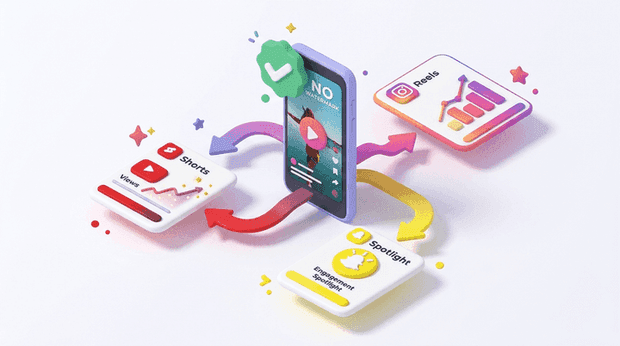
In 2021, Meta (Instagram) and Google (YouTube) publicly updated their recommendation guidelines for short-form video discovery feeds. Both platforms confirmed that their automated computer vision models identify and demote video uploads containing visible watermarks from competing services—most notably the bouncing TikTok logo.
When a creator cross-posts an in-app saved TikTok video directly to Instagram Reels or YouTube Shorts, the algorithm flags the watermark and limits the post's organic reach exclusively to existing followers, cutting off organic discovery from the explore feed.
Step 1: Save Clean Master
Paste your public TikTok link into QukTik and download the watermark-free 1080p MP4 directly to your device storage.
Step 2: Clean Metadata Audit
Verify video frame rates and audio synchronization. Clean MP4 files integrate effortlessly into Premiere Pro, Final Cut, or CapCut.
Step 3: Multi-Channel Post
Publish across YouTube Shorts, Instagram Reels, Facebook Reels, and Pinterest Idea Pins with zero watermark penalties.
Integrating Clean Social Assets into Professional NLE Timelines
Professional video editors working in commercial agencies, television broadcasting, and documentary filmmaking frequently license or curate user-generated content (UGC) from TikTok. Attempting to edit footage with hardcoded watermarks creates severe production roadblocks:
- Avoiding Destructive Cropping: In the past, editors had to scale up 1080x1920 footage by 125% to push bouncing watermark badges beyond the action-safe broadcast margins. This reduced visual clarity by 35% and created noticeable softness on 4K monitors.
- Timeline Frame Rate Conformity: QukTik downloads files in standard 30fps or 60fps progressive scan streams, preventing dropped frames or stuttering playback when dropped into a 24fps cinema timeline or 29.97fps broadcast sequence.
- Color Grading Cleanliness: Because the clean MP4 contains pristine original pixels untouched by translucent white watermark overlays, color grading tools like DaVinci Resolve can apply LUTs, contrast curves, and skin tone adjustments without creating halos around branding logos.
The Web Architecture Advantage: Why Zero-Install Tools Protect User Privacy
Many mobile app stores are crowded with third-party "video saver" applications that demand invasive phone permissions, access to user contact books, background GPS location tracking, or even TikTok login credentials. Using a clean, browser-based web utility ensures you never have to grant device permissions or install unnecessary third-party software.
QukTik provides a secure, progressive web architecture that eliminates these security vulnerabilities entirely:
100% Client-Side Sandboxing
QukTik runs directly inside your standard web browser (Chrome, Safari, Firefox, Edge). It operates within modern browser security sandboxes, with zero access to your device filesystem, camera, microphone, or private contacts.
Zero Account Login or Cookie Sharing
You never need to log into TikTok, share personal account details, or connect social profiles. All media extraction operations occur through public open-graph and CDN endpoints, providing a fast, private, and no-login browser experience.
Universal Device Guides: iOS Safari, Android Chrome, Windows & macOS
Because QukTik operates as a progressive, zero-install web utility over secure HTTPS, it functions smoothly across all major operating systems. Here are the precise platform steps:
Apple iOS (iPhone & iPad)
Safari on iOS 15, 16, 17, 18+
- In TikTok, tap the Share arrow on the video and tap Copy Link.
- Open Safari and navigate to QukTik. Tap the Paste Link button.
- Tap Download Video (Without Watermark). Safari will display a download confirmation prompt.
- Tap Download. Tap the blue circle icon in Safari's address bar, select the video, tap Share > Save Video. The clean MP4 will instantly appear in Apple Photos.
Google Android
Chrome, Samsung Internet, Firefox
- Copy the video link from TikTok's share sheet.
- Open Chrome, visit QukTik, and tap Paste Link.
- Tap Download Video (Without Watermark). The MP4 file saves directly to your device storage.
- Access the video instantly via Google Photos, Files by Google, or your native phone Gallery under
/Download.
Digital Preservation Best Practices for Ephemeral Internet Culture
Internet culture changes quickly. Accounts can be deactivated, licensing disputes can mute audio tracks, and platform rules evolve over time. Media historians, researchers, and archivists recognize that short-form video represents an important primary source record of early 21st-century human expression.
When building a personal or institutional archive of important cultural moments, follow these media preservation principles:
Standardized Container Formats
Always archive in non-proprietary MP4 (MPEG-4 Part 14) containers with baseline H.264 video and stereo AAC/MP3 audio. These formats possess universal hardware decoding support across all modern operating systems and will remain readable decades into the future.
Folder Hierarchy & Metadata Naming
Organize downloaded assets systematically using standardized ISO 8601 timestamps and creator handles (e.g., 2026-10-27_username_video-topic_1080p.mp4). This ensures seamless indexing and rapid searchability across multi-terabyte cold storage drives.
The 3-2-1 Backup Strategy
Protect your media collections against drive failure: maintain 3 copies of your archive on 2 different physical storage media (e.g., NVMe solid-state drive and network-attached storage), with at least 1 copy held off-site in secure encrypted cloud storage.
Archiving the Creator Economy: Studying Leading Cultural Personalities
The explosive rise of short-form video has birthed an influential new generation of digital personalities whose creative output shapes mainstream fashion, humor, culinary tastes, and consumer culture worldwide. Digital media scholars, advertising agencies, and fans frequently archive public video posts from top creators to analyze visual pacing, storytelling arcs, and community engagement.
From the universal deadpan comedy of Khaby Lame that crossed language barriers without speaking a single word, to the viral choreography pioneered by Charli D'Amelio (charli damelio / charlidamelio), Bella Poarch, and Addison Rae, short-form video transformed personal smartphone cameras into global broadcasting studios. Contemporary conversational vloggers and lifestyle tastemakers—such as Alix Earle, Brooke Monk (brooke monk / brookemonk_), Kat Stickler, and Tabitha Swatosh—have revolutionized authentic direct-to-camera storytelling.
Beauty & Aesthetic Pioneers
Industry researchers document product reviews and transformative cosmetics tutorials from influential voices like Mikayla Nogueira, Katie Sigmond, and Paige Niemann, studying visual authenticity in influencer marketing.
Comedy, Commentary & Parody
Archiving rapid satirical comedy, sketches, and improvisational commentary from creators like Brittany Broski, KallmeKris, Caitlin Reilly, Quenlin Blackwell, Bentellect, and Baylen Dupree.
Niche Passions & Subcultures
Documenting enthusiast movements from trainspotter Francis Bourgeois to lifestyle collectives like MomTok, as well as creators like Zach King, Khaby Lame, Charli D'Amelio, Gordon Ramsay, and MrBeast.
The Platform Ecosystem: TikTok Shop, TikTok Studio, Live Streaming & Lite Clients
The broader TikTok digital universe extends far beyond casual scrolling. Today, the platform encompasses a broad suite of interconnected creative and commercial technologies:
- TikTok Shop & E-Commerce Integration: Commercial creators and retail brands utilize TikTok Shop to broadcast interactive live selling events and video product showcases. Marketers rely on clean video downloads to study high-converting ad hooks, product demonstration camera angles, and customer testimonial packaging.
- TikTok Studio & Desktop Workflow: Creators utilize TikTok Studio to schedule posts, manage community comments, and monitor analytical dashboards across desktop workstations, making direct-to-browser media utilities like QukTik a practical tool in desktop post-production.
- TikTok Live, TikTok Coins & Stream Utilities: Live broadcasts (
tiktoklive) feature real-time creator interaction and live viewer counts (tiktok view), powered by digital tipping with virtual gifts (tiktokcoins), as well as specialized third-party community engagement software such as TikFinity, which bridges live video events with interactive audience mechanics. - Optimized Clients (TikTok Lite & Tik Lite): To accommodate users on entry-level smartphones and constrained cellular connections in emerging markets, ByteDance offers TikTok Lite (tik lite / tik toklite). These streamlined builds consume minimal storage while preserving core feed exploration.
- Desktop & Mobile Web Portals: Users frequently access the official
tiktok websiteor portals liketik tok com, manage their accounts via standard browser login (tiktoklogin), and explore public web feeds across desktop and mobile browsers for convenient media viewing and archiving. - Universal Search Variations: Everyday audiences discover content across different search terms and colloquial phrasing. Whether looking to archive creative clips, extract audio tracks, or backup slideshows, QukTik provides a reliable web gateway for all users without requiring account registration or software downloads.
Independent Web Architecture: Why Creators Choose Modern Web Utilities
When creators look for ways to archive their media, they often find older conversion websites that suffer from aggressive banner redirects, intrusive pop-up ads, or demands to install untrusted apps and browser extensions. Community discussions on creator forums frequently highlight concerns about privacy and device safety when using legacy ad-heavy downloaders.
QukTik was designed as a modern, clean web alternative. Instead of routing traffic through third-party ad networks or requiring software installations, QukTik operates entirely within your browser using secure HTTPS connections. It communicates directly with public content distribution nodes, delivering untouched 1080p video, 320kbps audio, and high-resolution photo carousels with complete user privacy.
Global Creator Accessibility: Supporting Communities Worldwide
Short-form digital media is a global medium with creators across every continent. QukTik is built to serve an international audience across diverse languages and network environments:
- Spanish & Latin America: Creators throughout Mexico, Colombia, Spain, and South America can quickly save videos without watermarks in Full HD directly to their camera roll or desktop storage.
- Turkish (Türkiye): Users across Istanbul and Ankara enjoy low-latency server connections for fast, unbuffered video downloads without software installation.
- Portuguese & Brazil: Brazilian creators easily archive dance routines, comedy skits, and tutorials with high-speed CDN delivery.
- Southeast Asia: Mobile-first creators across Indonesia, Malaysia, and the Philippines can archive videos smoothly even on constrained cellular data connections.
- Middle East & North Africa: Full bidirectional right-to-left (RTL) interface support ensures an intuitive, comfortable experience for Arabic-speaking creators.
- Europe & Worldwide: Comprehensive Unicode character parsing handles complex URLs, localized hashtags, and multilingual creator usernames without errors.
Direct Link Extraction: How URL Resolvers Parse Shared Links
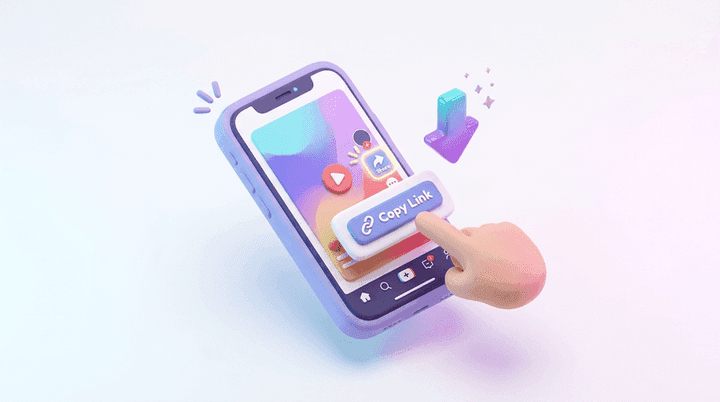
The most reliable way to save content starts with the video link. In the mobile app, tapping the Share button and selecting Copy Link generates a clean URL. When you paste that link into QukTik, our parser automatically follows the short redirect to locate the canonical post ID.
On desktop computers, simply copying the URL directly from your browser's address bar works instantly. Our system processes both short mobile sharing links and full desktop URLs, retrieving the master media asset in seconds without any manual configuration.
Intellectual Property Rights, Fair Use & DMCA Compliance
QukTik is an independent web utility built strictly for personal archiving, educational study, private backup, and fair-use creator repurposing of original user-generated content. All video, audio, photo, and trademark assets hosted on TikTok and Douyin remain the exclusive intellectual property of their original copyright owners and ByteDance Ltd. QukTik does not host, store, or archive copyrighted media files on its servers; all requests stream transiently through official public CDN endpoints.
Users must obtain explicit written authorization before re-distributing, monetizing, or utilizing another creator's media assets in commercial advertising campaigns. QukTik strictly complies with Digital Millennium Copyright Act (DMCA) regulations. For copyright notices, inquiries, or takedown requests, please consult our DMCA & Copyright Policy, review our Terms of Service and Privacy Policy, or contact our compliance team directly via our Contact Support form. Learn more about our team mission on the About QukTik page.