Why Does TikTok Add a Watermark & Why Does Cropping Fail?
TikTok intentionally burns an animated logo into videos saved through its native app for brand marketing. They want users on Instagram, Facebook, and Twitter to instantly recognize that the clip originated on TikTok. To prevent simple static cropping, ByteDance programmed the watermark to bounce: it starts in the top-left corner and then jumps to the bottom-right corner every few seconds, layered directly over the creator's username.
This design creates significant challenges for viewers and creators:
- Obstructed Content: The bouncing badge frequently covers important subtitles, culinary recipe measurements, fitness form cues, or faces.
- Destructive Aspect Ratios: Primitive watermark removal apps attempt to crop the edges of the video canvas. Cropping a 1080x1920 video to remove corners reduces resolution down to 800x1400 or lower, destroying sharpness.
- Gaussian Blur Smudges: Some tools apply an artificial blur over the logo. This leaves an ugly, pixelated smudge that draws more viewer distraction than the original logo itself.
How QukTik Operates Differently: Rather than performing destructive post-processing on a watermarked file, QukTik queries ByteDance's global content distribution nodes directly. When a video is uploaded, an untouched master file is written to the server before the watermark render queue executes. If you only require the audio stem or background music rather than the video, you can utilize our specialized TikTok to MP3 Converter or create custom smartphone ringtones. QukTik retrieves this original untouched file stream (play_addr), delivering a 100% clean video with full resolution, vibrant color gamuts, and zero pixel distortion.
The Multi-Platform Repurposing Funnel for Content Creators
For professional digital creators, brand managers, and small business owners, producing engaging video content requires substantial time and creative effort. To maximize return on investment, successful creators never post their work to just one social network. They cross-post across YouTube Shorts, Instagram Reels, Facebook Reels, Snapchat Spotlight, and Pinterest Idea Pins. For creators publishing still image carousels, our TikTok photo slideshow downloader extracts individual JPG frames, while our TikTok story saver archives 24-hour disappearing clips.
However, automated recommendation algorithms on Instagram and YouTube actively penalize videos that bear the TikTok logo watermark. Meta and Google specifically updated their recommendation guidelines to deprioritize watermarked media, severely limiting organic distribution in explore tabs.
Algorithmic Reach
Clean MP4 files pass automated computer vision audits on Instagram and YouTube, qualifying your videos for full algorithmic distribution on Reels and Shorts feeds.
Sponsor & Client Standards
Brand sponsors and corporate clients expect immaculate media deliverables. Presenting portfolio work or commercial case studies without watermarks elevates professionalism.
Long-Term Digital Backup
Social platforms can experience sudden account suspensions, shadowbans, or accidental deletions. Saving high-bitrate master files to your local hard drive ensures your creative legacy is secure.
Technical Benchmark: QukTik vs. Competing Video Downloaders
The web is flooded with unreliable download sites loaded with deceptive banner ads, forced app installations, and slow conversion servers. Here is how QukTik compares across critical performance criteria:
| Performance Metric | QukTik Video Downloader | Typical Online Converters | Screen Recording |
|---|---|---|---|
| Watermark Removal Technique | Direct CDN Stream Extraction | Edge cropping or blur filters | Captures full watermark & UI icons |
| Output Resolution | Original 1080p / 720p 60fps | Downscaled to 480p/720p | Device display resolution |
| Audio-Video Lip Synchronization | Frame-Accurate AAC Stereo | Audio drift / sync delay | Microphone ambient noise risk |
| Download Speed | Instant (Under 2 Seconds) | 15-45 seconds in queue | Requires real-time playback |
| Software Installation | None (Pure Web Browser) | Requires extra app or extension installs | Built-in OS utility |
| Device Privacy | 100% Secure (HTTPS, No Logs) | Intrusive pop-ups and tracking scripts | Local capture |
Complete Device Walkthrough for Mobile and Desktop Systems
QukTik is engineered to work flawlessly on any operating system without installing extra software. Follow these tailored instructions:
Apple iOS (iPhone & iPad)
Safari on iOS 14, 15, 16, 17, 18+
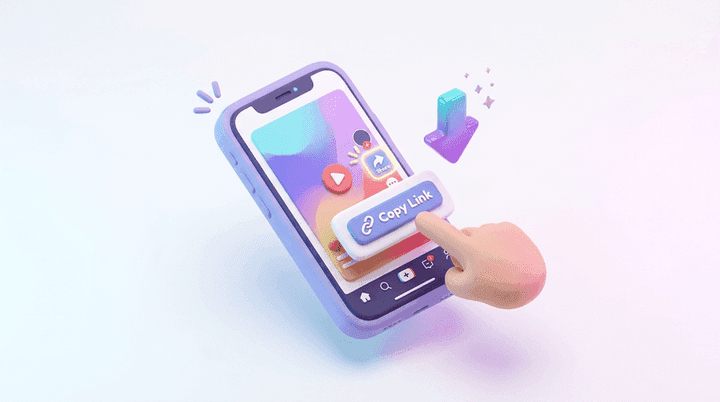
- In TikTok, open the video you want to save, tap the Share button, and tap Copy Link.
- Launch Safari, navigate to QukTik, tap the Paste Link button, and tap Download HD Video.
- When Safari displays the download confirmation, tap Download.
- Tap the blue download icon in Safari's address bar, tap the completed MP4 video, tap the bottom-left Share icon, and select Save Video. The clean video is now safely in your Photos app.
Google Android
Chrome, Samsung Internet, Firefox
- In the TikTok app, tap Share and select Copy link.
- Open Google Chrome or your preferred browser, visit QukTik, and tap Paste.
- Tap Download HD Video.
- The MP4 file downloads automatically to your internal
/Downloadfolder. You can immediately access it via Google Photos, Files by Google, or your device Gallery.
Computer Shortcuts for Windows PC, macOS & Linux:
Windows & Linux: After pressing Download, files save directly into your user Downloads directory (C:\Users\Username\Downloads). Press Ctrl + J in Chrome or Edge to reveal the file.
macOS (MacBook & iMac): Files save straight to Finder Downloads. Press Cmd + Option + L in Safari or Cmd + Shift + J in Chrome to open the folder immediately.
Troubleshooting Common Video Link & Download Issues
If you encounter an issue when attempting to download a TikTok video, review these common causes and verified solutions:
Error: “Invalid TikTok URL format”
Ensure you copied a full, valid video link containing the domain tiktok.com or mobile short links (vt.tiktok.com). If you copied user bio text or chat messages accidentally, return to the video, tap Share, and tap Copy Link again.
Error: “Video is private or removed”
QukTik respects platform privacy standards and only supports public videos and does not access private or “Friends Only” posts. The video must be publicly viewable on TikTok.
Video Plays in Browser Instead of Saving to Camera Roll (iOS)
On iPhone Safari, tapping a media link may trigger in-browser playback. Tap the Share icon at the bottom of Safari, scroll down, and select Save to Files or Save Video to move the MP4 into Apple Photos.
The Evolution of Web Downloaders: QukTik vs. Legacy Tools (SnapTik, SSSTikTok, TikSnap & TikFlow)
The online ecosystem for saving social media clips has evolved dramatically over the last several years. Early web utilities—frequently searched by users under names like SnapTik (snap tik, snaptic, snaptikapp, snaptiks, snaptik video downloader, snaptik tiktok downloader, snaptik apl, snaptik spp, snaptik tik tok video download, snaptik watermark remover, tiksnap download), SSSTikTok (sss tiktok, ssstiktok app, sss tik, sss tiktoj, sss tok tok, ssstik tik tok), and legacy downloaders like TikFlow—were pioneers in demonstrating that users could obtain videos without an embedded bouncing badge.
However, many legacy platforms suffered from significant technical compromises: slow transcoding queues, misleading fake download buttons, aggressive banner redirects, and lossy re-compression that capped video streams at 720p or 480p resolution. Users searching for terms like download tiktok video no watermark, tiktok downloader hd, download video tiktok, tik tik downloader, or tiktok download video often found themselves frustrated by broken download links or unsolicited software installation prompts.
| Capability / User Experience | QukTik Next-Gen Downloader | Legacy Downloaders (SnapTik, SSSTik, TikFlow) | Third-Party Mobile Apps |
|---|---|---|---|
| Direct Master Stream Access | Pristine 1080p60 Source Quality | Often downscaled to 720p | Re-compressed screen capture |
| Ad Clutter & Deceptive Popups | Zero Deceptive Buttons / Clean UI | Heavy full-screen interstitial ads | Invasive background notifications |
| Security & Device Permissions | No App Install, 100% Web Sandbox | Browser cookie tracking | Demands storage, contacts, GPS access |
| Multi-Asset Support (Audio, Photos) | All-in-One Suite (MP4, MP3, Carousels) | Video only / fragmented tools | Paid subscription required |
From quick mobile saves to high-throughput desktop editing, QukTik provides a fast, watermark-free media archiving experience with strict user privacy and zero software installs.
Master-Quality Video Extraction: High Definition and Clean Stream Delivery
For video editors, content creators, and digital archivists, visual fidelity is non-negotiable. Standard web converters often compress video files, resulting in lower visual clarity and softened text overlays. QukTik preserves the original high-definition video stream so creators and editors get crisp 1080p quality.
By connecting directly to high-throughput edge nodes, our parser delivers the exact progressive MP4 video stream uploaded by the creator, in full 1080p or source 4K resolution whenever available. Color accuracy, edge sharpness, and subtle motion details remain pristine, giving editors an ideal clean canvas for post-production and multi-platform publishing.
Additionally, files are exported in universally compatible H.264 video containers with AAC stereo audio. Whether you import clips into desktop software like Premiere Pro and DaVinci Resolve or edit on mobile apps like CapCut and InShot, the files load instantly without needing format conversions or third-party codecs.
Intellectual Property Rights & Fair Use Ethics
QukTik Video Downloader is intended strictly for personal archiving, academic study, research, and fair-use repurposing of your own original intellectual property. Please always obtain permission from the original creator before re-uploading or using their work for commercial purposes.
All trademarks, logos, and brand names belong to their respective owners (ByteDance Ltd., TikTok). For videos originating on ByteDance's domestic Chinese platform, use our Douyin Downloader, or inspect creator profiles with the TikTok Avatar Downloader. Review our DMCA Policy, Privacy Policy, or reach us via Contact Support.